Bridging the Gap: Spanning Tree Protocol and EtherChannel


Spanning Tree Protocol (STP) is the ultimate safety net for any Layer 2 network, but it comes with a frustrating catch: to prevent broadcast storms, it ruthlessly blocks redundant links. If you run four 1Gbps cables between two core switches, STP will shut down three of them, leaving you with 3Gbps of dark, wasted fiber. This is where EtherChannel steps in. By bundling physical links into a single logical connection, we can finally stop wasting bandwidth while keeping STP completely happy.
The Load Balancing Problem: Packets vs. Flows

It’s tempting to think of an EtherChannel bundle as a single massive pipe where packets are just thrown round-robin across whichever physical cable is free. But doing that would be disastrous. If a switch sent packet 1 down link A, and packet 2 down link B, microscopic variations in latency would cause those packets to arrive out of order. Because endpoints and upstream devices generally don't have a reliable Layer 3 mechanism to reassemble out-of-order packets on the fly, your application sessions would start corrupting and dropping.
Instead, EtherChannel load-balances based on Network Flows. A flow is a continuous conversation between two endpoints—think of a single large file transfer or an active SSH session. By using a hashing algorithm (usually looking at a combination of source/destination IP and MAC addresses), EtherChannel ensures that every single packet belonging to a specific flow is pinned to the exact same physical link in the bundle. The overall traffic is balanced efficiently across all the cables, but packet order for any individual conversation is perfectly preserved.
Instant Failover: Beating the STP Timer

Beyond just multiplying bandwidth, EtherChannel gives us a massive High Availability advantage. Let’s say you have a bundle of four fiber links acting as your core uplink. What happens if an SFP module burns out or someone accidentally yanks out one of the cables?
Normally, a physical link going down forces Spanning Tree to recalculate its topology, potentially causing a 30-to-50-second outage while backup ports transition from blocking to forwarding. But because STP views the entire EtherChannel group as one single, unbreakable logical interface, a dropped physical cable doesn't trigger an STP recalculation. The switch simply detects the dead physical link and instantaneously redistributes its assigned flows across the remaining surviving links. The result? Zero STP convergence delay, zero dropped sessions, and no network panic.
Choosing Your Protocol: LACP, PAgP, or Static

When it comes time to actually group your physical interfaces together, the switches need a way to negotiate and verify that the bundle is healthy before passing traffic. You have three configuration options:
- Link Aggregation Control Protocol (LACP): This is the open standard and the absolute preferred method in production. LACP actively negotiates the creation and maintenance of the bundle. Interfaces can be set to Active or Passive. Best practice? Set both sides to Active. This ensures both switches are aggressively negotiating and there is zero confusion about the state of the link.
- Port Aggregation Protocol (PAgP): This is Cisco’s proprietary equivalent to LACP. It uses Desirable and Auto modes. While it works perfectly well in an all-Cisco environment (by setting both sides to Desirable), it's generally avoided today in favor of LACP to ensure compatibility with third-party switches and servers (like VMware hosts).
- Static EtherChannel: This is the manual override (configured with mode
on). There is absolutely no negotiation protocol running between the switches. If you configure one side statically, it assumes the other side is perfectly configured and starts forwarding traffic immediately. This is extremely dangerous—if the other side isn't configured correctly, you can instantly create the exact catastrophic Layer 2 loop that STP was trying to prevent.
Switches are incredibly ruthless about which physical ports they allow to bundle together. Whether you are using LACP, PAgP, or Static mode, the following parameters must perfectly match across all physical interfaces on both sides of the link. If even one parameter is off, the bundle will fail to form, and STP might step in to block the port entirely:
- Speed and Duplex (e.g., all ports must be
1000/full) - Switchport Mode (all must be Access, or all must be Trunk)
- VLAN Assignments (Native VLANs, Allowed Trunk VLANs, and Access VLANs must be absolutely identical)
Trust but Verify: Proving the Bundle is Alive
Once you’ve configured your interfaces, you need to prove the bundle actually formed. If you blindly assume it worked, you might be sitting on a suppressed Layer 2 loop. There are two primary commands you need to master for the CCNA (and the real world).
1. The Direct Check: show etherchannel summary

This is your daily driver. As you can see in the output above, this single command answers three critical questions instantly:
- Did the channel create successfully? You'll see the logical Port-Channel interface (e.g.,
Po1) and its status flags. You want to seeSU(Layer 2 and In Use). - What protocol are we running? It will explicitly list
LACP,PAgP, or-for Static. - Which physical interfaces are members? It lists the bundled ports. You want to see a
(P)next to each physical interface, meaning they are bundled in the port-channel. If you see a(D)(Down) or(S)(Suspended), you have a configuration mismatch to hunt down.
2. The STP Check: show spanning-tree vlan X
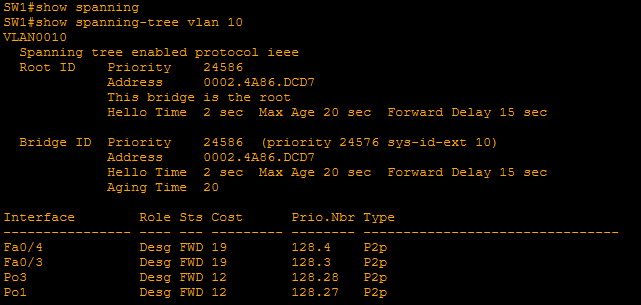
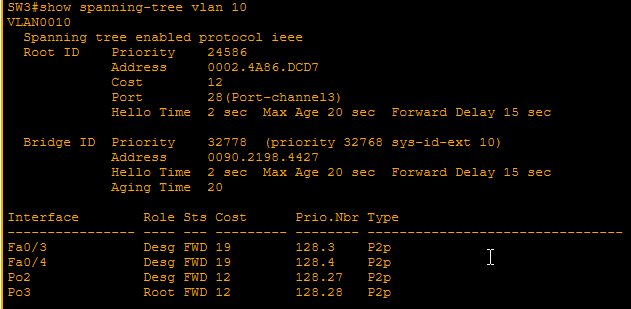
Wait, why are we using a Spanning Tree command to verify EtherChannel? Because STP is the ultimate judge of your Layer 2 topology.
Look closely at the first screenshot: If your EtherChannel formed perfectly, show spanning-tree will no longer list your individual physical interfaces (like Fa0/1, Fa0/2). Instead, it will only list the single, logical Po interface, proving that STP has been successfully tricked into seeing the bundle as one massive link.
In the second screenshot, notice what happens in a redundant loop topology. STP evaluates the entire Port-Channel bundle as a single path. Instead of blocking an individual wire, it places the entire logical Po2 interface into the BLK (Blocking) state to prevent a broadcast storm. If you ever run this command and see your physical interfaces listed separately instead of the logical Po interfaces, your bundle has failed, and STP is stepping in to block the redundant physical links.
Looking Forward: Multi-Chassis EtherChannel (MEC)
Everything we’ve covered so far involves bundling links between two single switches. But what if one of those switches loses power completely? You lose the entire bundle.
While you won't be heavily tested on MEC configuration for the CCNA 200-301, modern enterprise networks take this a step further using Multi-Chassis EtherChannel (MEC). By using switch redundancy protocols, you can connect your EtherChannel physical links to two different physical upstream switches that are clustered together to act as one logical switch.
If you want to look at the next level of architectural redundancy beyond the CCNA, look into:
- StackWise: For Catalyst 3750, 3850, and 9000 access switches.
- Virtual Switching System (VSS): For legacy Catalyst 4500/6500 chassis switches.
- Virtual Port Channel (vPC): The modern standard for Nexus data center switches.
These technologies allow you to maintain active/active forwarding paths across multiple physical boxes without triggering STP loops, giving you the ultimate resilient topology.