Hunting a Ghost in the NIC: Fixing Intel e1000e Hardware Unit Hangs Across a Proxmox Cluster


Hello everyone,
Just days after writing about replacing my unmanaged Tenda switch with a Cisco Catalyst 3560-CG, I mentioned a specific reason why enterprise switching matters: when a Proxmox node starts dropping packets, an unmanaged switch gives you zero telemetry.
Well, the homelab must have heard me, because this week two of my nodes—lab03 (10.1.1.13 on Gi0/3) and lab04 (10.1.1.14 on Gi0/4)—decided to randomly drop off the network and disappear from the Proxmox cluster. No graceful shutdowns, no ping replies, just silent nodes sitting on my shelf.
What followed was a classic bottom-up troubleshooting session that bounced between Cisco IOS switchports, legacy SSH cipher negotiation, Linux kernel ring buffers, and an infamous Intel NIC driver bug (e1000e: Detected Hardware Unit Hang) lurking across my entire 7-node fleet.
Here is the full breakdown of how I isolated the failure—after almost pulling all my beard hair out, hah!—why a simple shut / no shut temporarily masked it, how I permanently fixed it across the cluster, and the engineering lessons worth keeping in your back pocket.
The Initial Symptom: Silent Node Drops (lab03 & lab04)
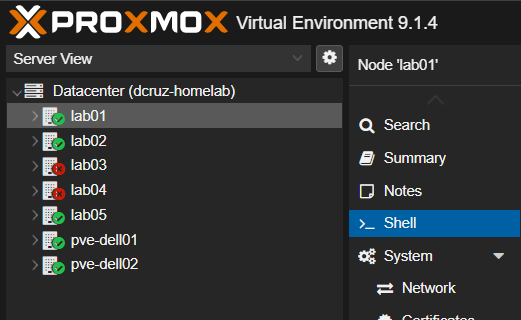
Both lab03 (a Lenovo ThinkCentre M70q running K3s worker workloads) and lab04 (an HP ProDesk 600 G6 Desktop Mini hosting my K3s control plane) suddenly became unreachable over SSH and the Proxmox web UI. I had seen this before, but I had thought the root cause was the cheap Tenda switch that I had been running as part of the lab for the last year.
When the two nodes in question started silently dropping off the network again on brand-new enterprise switching, I immediately started listing out suspects at different levels:
- Layer 1 / Layer 2 (Switch & Cabling): Did BPDU Guard err-disable the port, or did a patch cable lose link?
- Host OS / Kernel NIC Driver: Did the machine go to sleep, or did the Ethernet driver wedge?
- Layer 3 / ARP: Is there an IP conflict or broken bridge configuration?
To figure out which layer or component was the root cause, I started from the core switch (SW-CORE-01 at 10.1.1.9) and worked outward, eliminating suspects as I went.
Isolating Layer 1/2 (and Fighting Legacy IOS SSH)
Instead of pulling the USB console cable back out, I jumped onto lab01 (10.1.1.11, our storage/backup node that was still happily online) to SSH straight into the Catalyst 3560-CG.
Immediately, modern OpenSSH rejected the handshake:
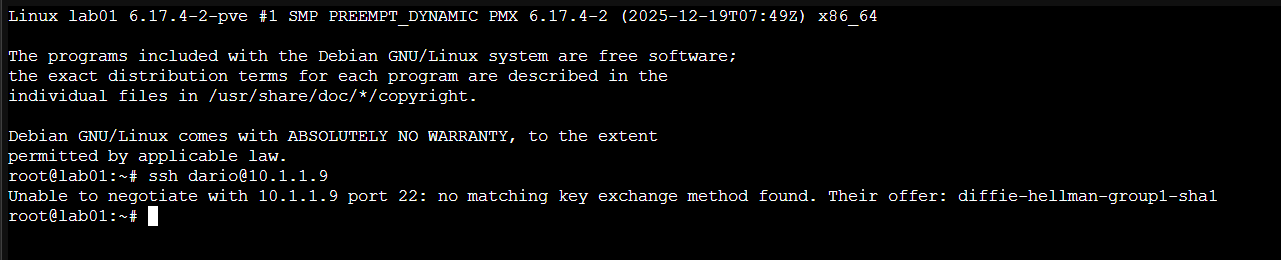
Because the 3560-CG runs IOS 12.2(55)EX, its SSHv2 daemon only negotiates legacy SHA-1 key exchange algorithms, ssh-rsa host keys, and CBC-mode ciphers—all of which modern Debian/OpenSSH disables by default. Rather than weakening global SSH client defaults, you can override them inline just for that session:

(Pro-tip: If you manage legacy lab gear often from a jump host, scope those three lines strictly inside ~/.ssh/config under Host 10.1.1.9 so you never lower defaults for anything else.)
Once on SW-CORE-01#, I bounced the affected switchport with a shutdown followed by no shutdown. Almost instantly, lab04 came right back online, so I bounced the port for lab03 as well.

Getting a node back online with shut / no shut is triage, not a root cause. In Cisco IOS, shut / no shut commonly fixes two completely unrelated problems:
- Clearing an
err-disabledport state (such as BPDU Guard tripping on a PortFast port). - Forcing a physical carrier drop that kicks a hung host NIC driver into resetting itself.
If you don't check which one happened, the outage is guaranteed to come back.
Checking the Kernel Logs (dmesg -T) — The Smoking Gun
With lab04 reachable again, I hopped onto its shell and queried the kernel ring buffer with human-readable timestamps (-T), filtering specifically for Ethernet drivers, link state transitions, and hangs:
dmesg -T | grep -iE "link|eth|enp|eno|r8169|e1000e|hang|reset|timeout"
That single command immediately spilled 18 straight minutes of failure telemetry:
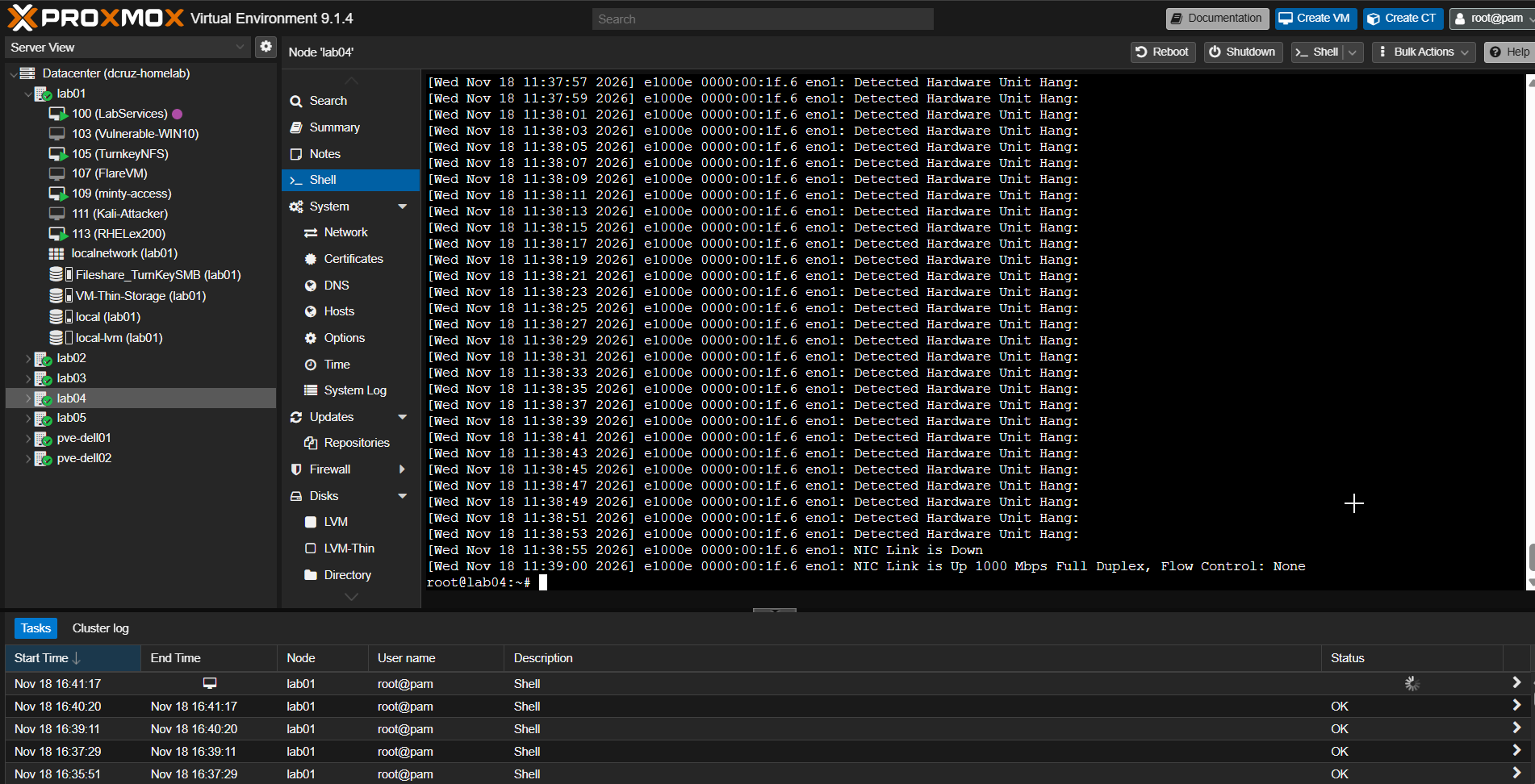
[Wed Nov 18 11:20:45 2026] e1000e 0000:00:1f.6 eno1: Detected Hardware Unit Hang:
[Wed Nov 18 11:20:47 2026] e1000e 0000:00:1f.6 eno1: Detected Hardware Unit Hang:
[Wed Nov 18 11:20:49 2026] e1000e 0000:00:1f.6 eno1: Detected Hardware Unit Hang:
... (repeating every 2 seconds for 18 minutes) ...
[Wed Nov 18 11:38:53 2026] e1000e 0000:00:1f.6 eno1: Detected Hardware Unit Hang:
[Wed Nov 18 11:38:55 2026] e1000e 0000:00:1f.6 eno1: NIC Link is Down
[Wed Nov 18 11:39:00 2026] e1000e 0000:00:1f.6 eno1: NIC Link is Up 1000 Mbps Full Duplex, Flow Control: None
Look at those exact timestamps:
- At
11:20:45,eno1(the onboard Intel NIC at PCI address0000:00:1f.6) locked up and started throwingDetected Hardware Unit Hang:every two seconds. - At
11:38:55—the exact second I ranshut/no shutonGi0/4—the kernel loggedNIC Link is Down. - Five seconds later at
11:39:00,no shutbrought the link back up (1000 Mbps Full Duplex), clearing the wedged queue.
Mystery solved: The Cisco switch didn't drop the node. The host's Intel e1000e NIC wedged itself, and bouncing the switchport simply forced a carrier loss that made the Linux driver reset the hardware.
Auditing the Rest of the Fleet (lab03, lab01 & All 7 Cluster Nodes)
Whenever you find a hardware/driver bug in a homelab or production cluster, your next question should always be: "What else in my fleet shares this exact hardware?"
I ran the same dmesg -T check on lab03:
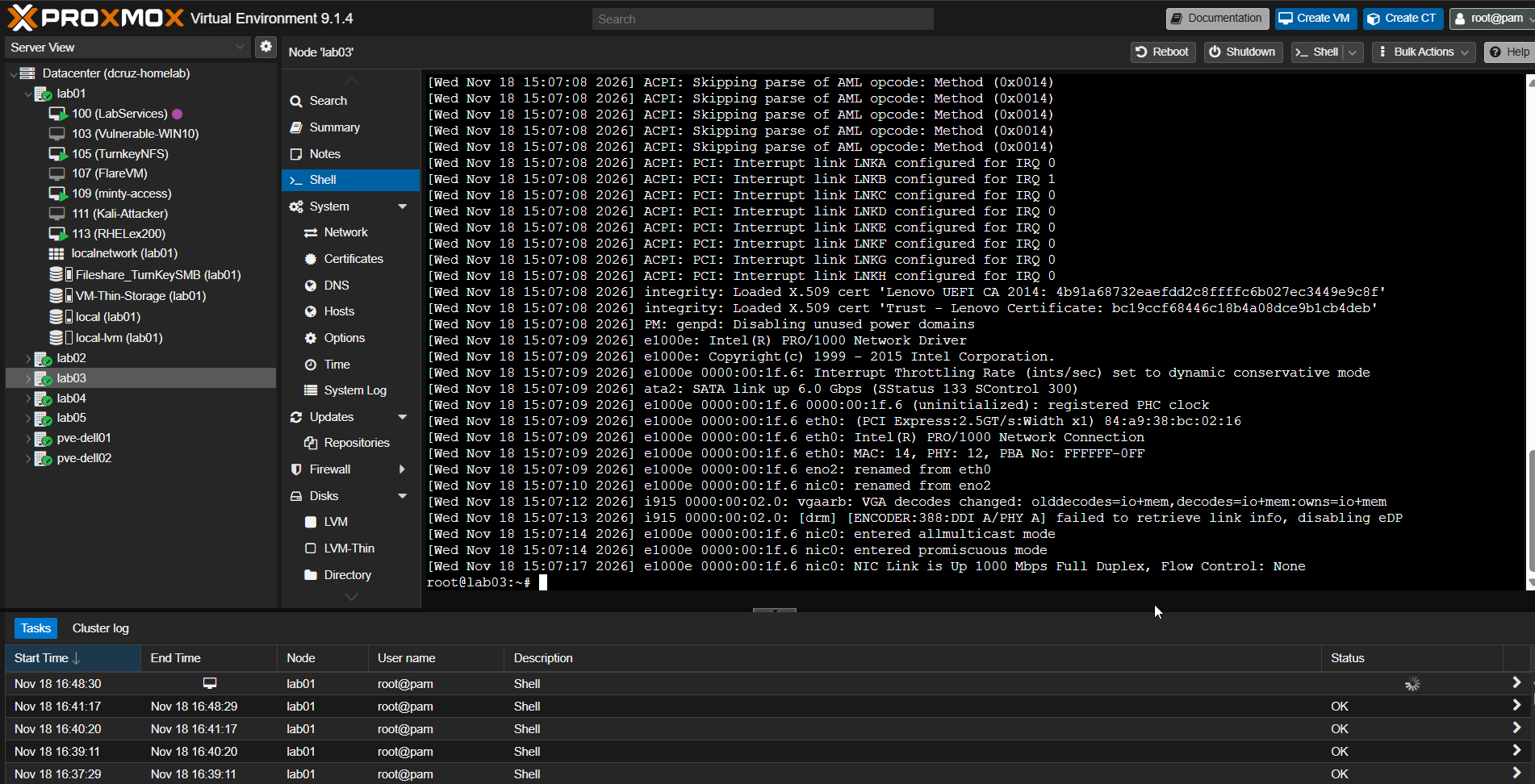
[Wed Nov 18 15:07:08 2026] DMI: LENOVO 11MY001RUS/31A7, BIOS M3JKT2AA 10/15/2021
...
[Wed Nov 18 15:07:09 2026] e1000e: Intel(R) PRO/1000 Network Driver
[Wed Nov 18 15:07:09 2026] e1000e 0000:00:1f.6 nic0: renamed from eno2
[Wed Nov 18 15:07:17 2026] e1000e 0000:00:1f.6 nic0: NIC Link is Up 1000 Mbps Full Duplex, Flow Control: None
Two important takeaways popped out immediately:
lab03uses the exact samee1000edriver (0000:00:1f.6, interfacenic0).- Its
dmesgstarted at15:07:08becauselab03had been rebooted less than two hours earlier—wiping the in-memory kernel ring buffer from before the drop! (Note: If you ever need to see a kernel hang that happened before a reboot, check the previous boot's persistent systemd journal withjournalctl -b -1 | grep -iE "e1000e|hang".)
Then I audited lab01 (eno2 bridged to vmbr0), lab05 (nic0), and even my dual Dell Latitude 5420 hypervisors (pve-dell01 and pve-dell02 on nic0). Every single one of them uses the exact same e1000e driver on 0000:00:1f.6! Leaving lab01—my primary NFS storage and Proxmox Backup Server node—unpatched was just waiting for a heavy NFS backup job to wedge the storage tier.
The Root Cause: Why Does e1000e Hang Under Proxmox?
Normally, to save CPU cycles, modern Linux kernels use hardware offloading to push packet segmentation and reassembly work down to the network card's silicon:
- TSO (TCP Segmentation Offload): Lets the kernel hand a massive TCP buffer (up to 64 KB) to the NIC, trusting the NIC hardware to slice it into standard 1,500-byte Ethernet frames.
- GSO (Generic Segmentation Offload): Defers packet segmentation as late as possible before hitting the driver/NIC boundary.
- GRO (Generic Receive Offload): Reassembles incoming packets into larger frames before passing them up the network stack.
On Intel I219-LM (e1000e) hardware paired with modern Linux kernels and Proxmox bridged/virtualized workloads (vmbr0, Corosync heartbeats, Kubernetes overlay traffic, and NFS transfers), a known silicon/driver quirk causes the NIC's TX descriptor ring to deadlock while processing these offloaded super-frames. Once the TX ring stalls, the NIC stops transmitting completely and spams Detected Hardware Unit Hang: every two seconds until the interface is reset.
The Fix: Disabling Problematic Offloads with ethtool
To stop the hang permanently, we bypass the broken hardware offload path and let the CPU handle packet segmentation cleanly in software (on modern multi-core CPUs at 1 Gbps, the CPU overhead is negligible).
Live Remediation (Zero Downtime / No Reboot)
Install ethtool if it isn't already present on your Proxmox host, then disable TSO, GSO, and GRO on the physical NIC (replace <nic_name> with eno1 on lab04, eno2 on lab01, or nic0 on lab03/lab05/pve-dell01/pve-dell02):
apt update && apt install -y ethtool
ethtool -K <nic_name> tso off gso off gro off
Breaking down those flags:
-K <nic_name>- Modifies hardware offload features on the specified physical network interface (apply this to the physical NIC, notvmbr0).tso off- Disables TCP Segmentation Offload so the kernel slices TCP segments cleanly to MTU size before passing them to the NIC's TX ring.gso off- Disables Generic Segmentation Offload across non-TCP/generic protocols.gro off- Disables Generic Receive Offload on the receive path to keep frame handling uniform across the Proxmox bridge.
Making It Persistent Across Reboots
ethtool changes are runtime-only; a reboot wipes them. To make the fix permanent, hook it into /etc/network/interfaces right under the physical interface definition:
iface eno1 inet manual
        post-up /sbin/ethtool -K eno1 tso off gso off gro off
Here is that persistent configuration in place on lab04 (eno1), lab01 (eno2), and rolled out to the Dell hypervisors (pve-dell02 on nic0):
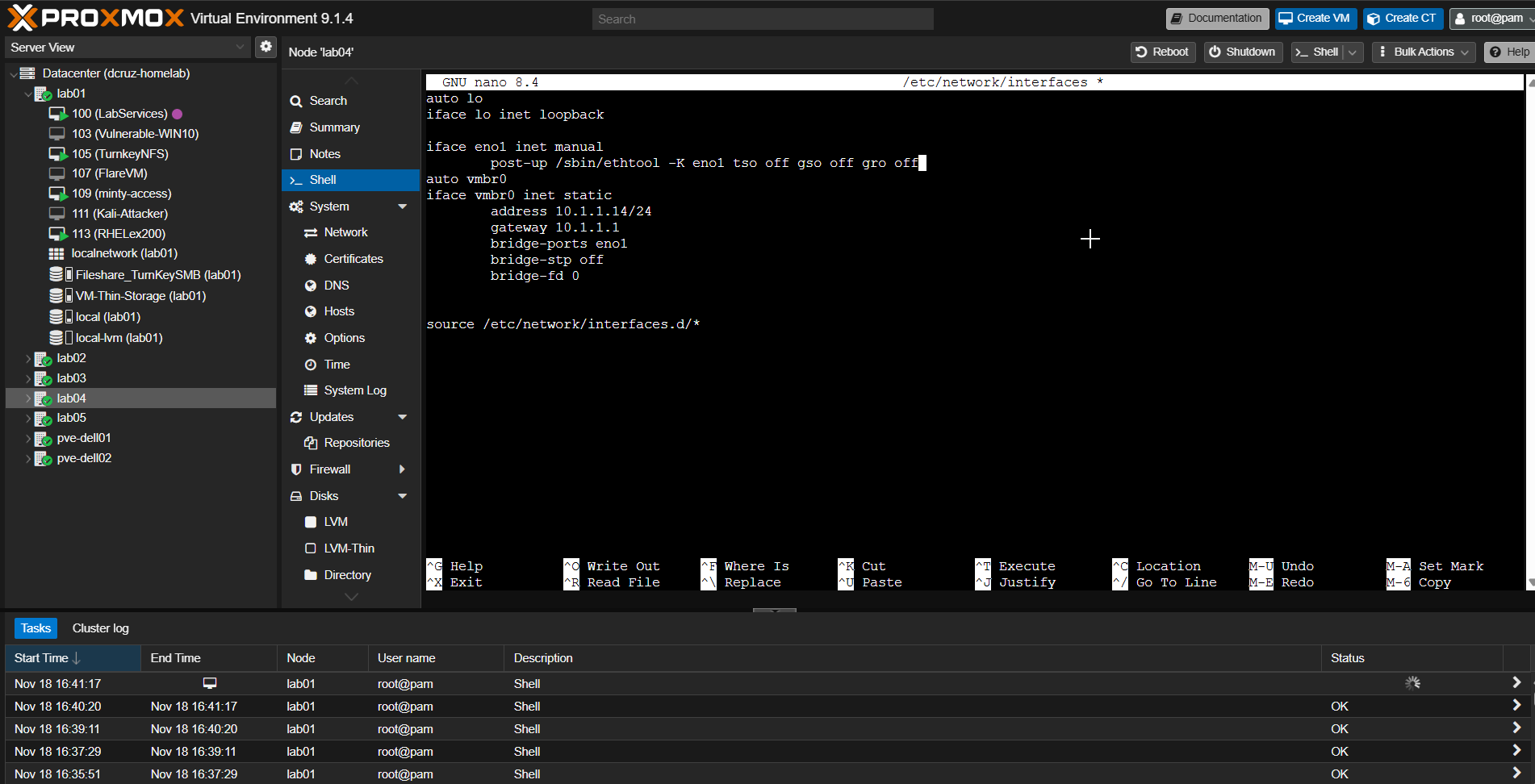
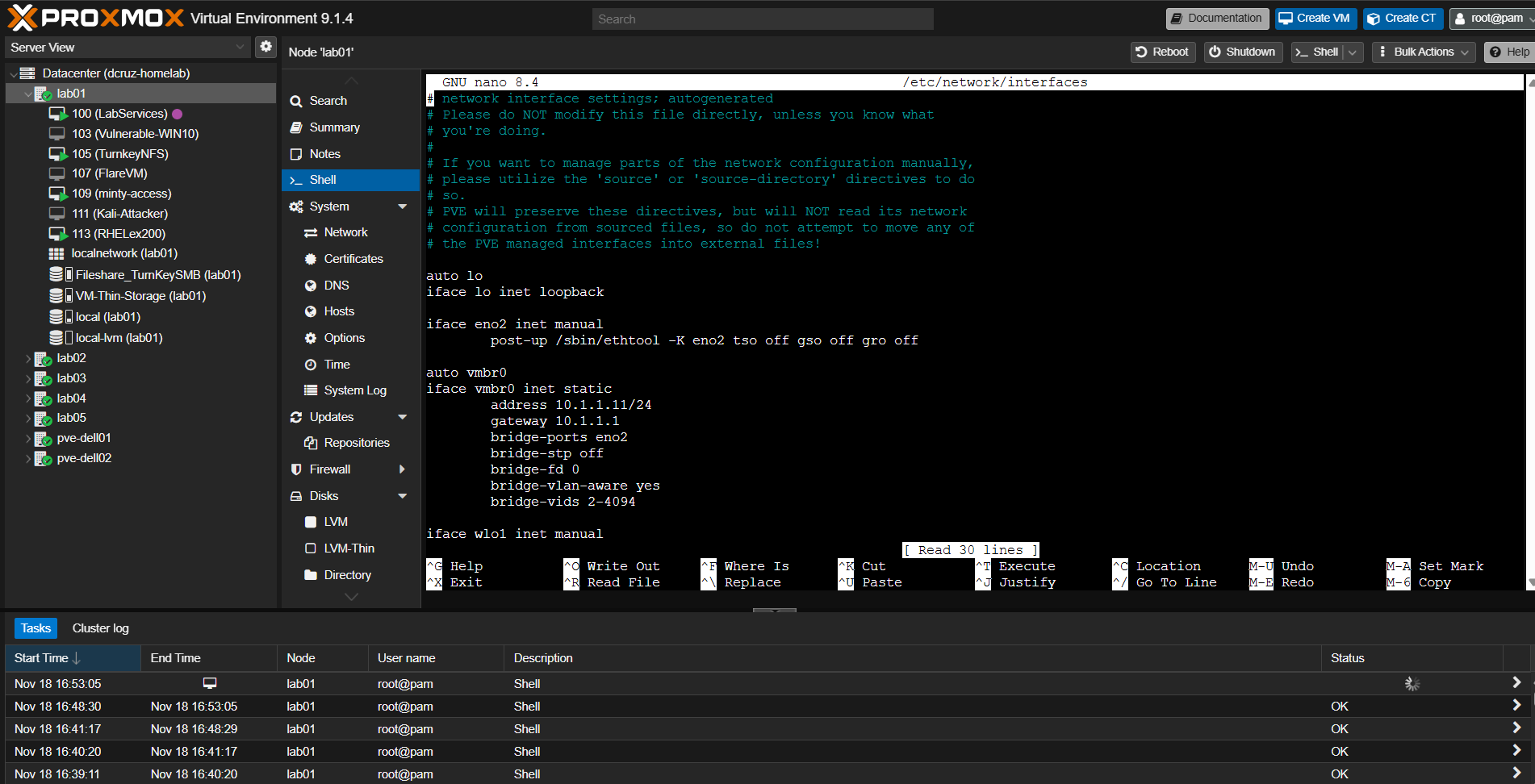
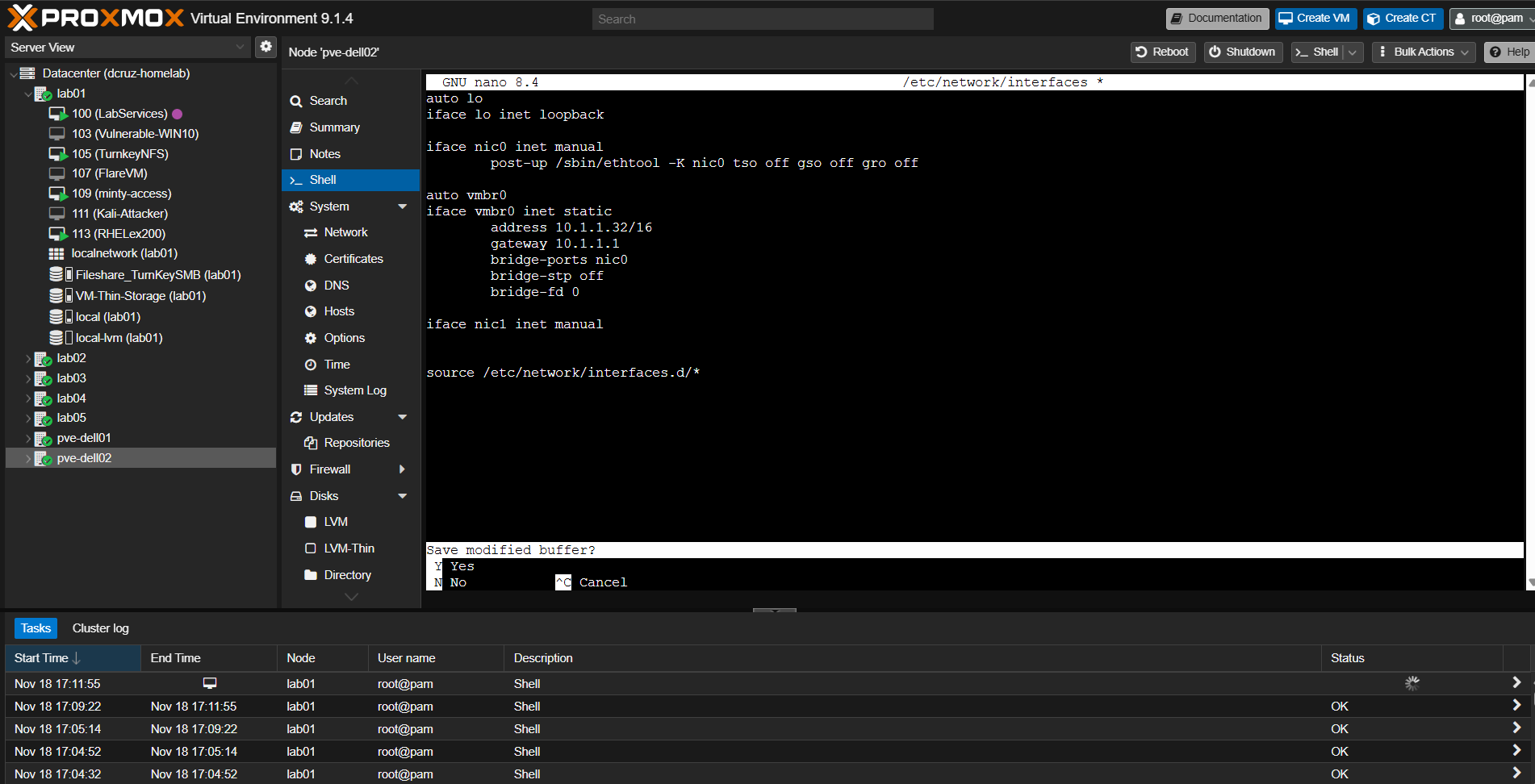
(Note: Always run ip -br link show or check /etc/network/interfaces first so your ethtool -K interface name matches the node—for example, hitting netlink error: no device matches name on lab05 reminded me that its physical interface was renamed to nic0 rather than eno2!)
Verification: Trust, but Verify
Run ethtool -k against the physical NIC to prove the kernel actually turned all three offloads off:
ethtool -k eno1 | grep -E "tcp-segmentation-offload|generic-segmentation-offload|generic-receive-offload"
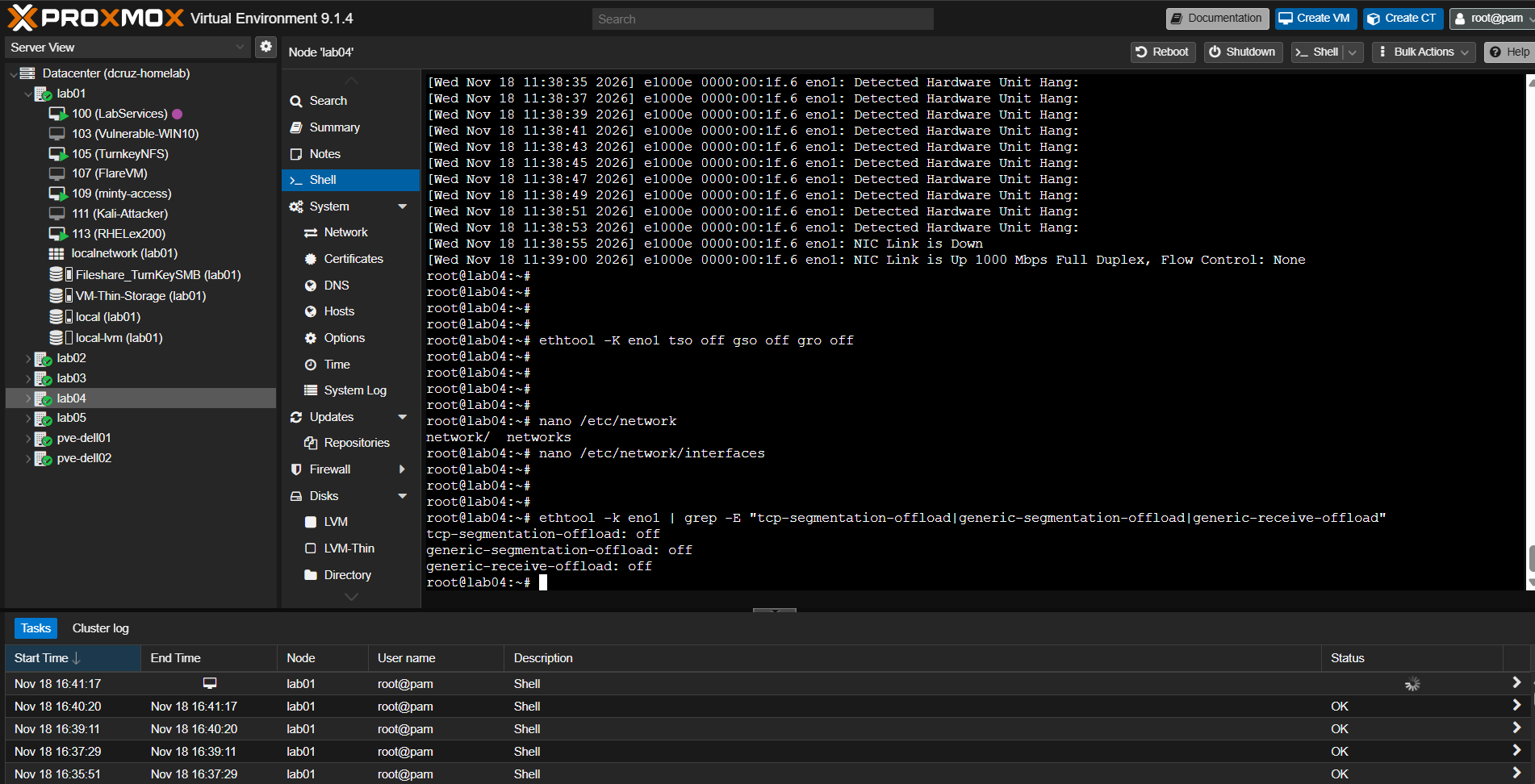
Healthy Output:
tcp-segmentation-offload: off
generic-segmentation-offload: off
generic-receive-offload: off
Since rolling this post-up configuration out across every e1000e node in my 7-node cluster, the Detected Hardware Unit Hang log storms vanished completely, and cluster uptime has been rock-solid (finally).
Key Lessons Learned
- Managed Switch Telemetry Still Wins—Even When the Switch Isn't at Fault: Having the Catalyst 3560-CG on
10.1.1.9let me inspect port state, verify Spanning Tree wasn't blocking, and bounceGi0/4cleanly from SSH without walking over with a crash cart. That singleshut/no shutgave me the exact timestamp correlation (11:38:55) I needed insidedmesg. - Never Confuse Symptom Relief with Root Cause: Bouncing the switchport (or rebooting
lab03) restored connectivity, which is tempting to call "fixed." Checking the logs after recovery is what separated a temporary band-aid from finding the underlying driver lockup. - Reboots Destroy In-Memory Kernel Evidence:
lab03had been rebooted before I pulleddmesg, wiping the crash logs. Always checkdmesg -Tbefore rebooting a misbehaving Linux box—or fall back tojournalctl -b -1. - One Node's Bug Is Usually the Whole Fleet's Bug: Enterprise mini-PCs (
ThinkCentre,ProDesk,OptiPlex) and laptops (Latitude 5420) share the same Intel chipset family. Auditing the entire cluster immediately after fixinglab04saved my NFS storage (lab01) and Windows hypervisors (pve-dell01/pve-dell02) from hitting the exact same outage later. - Persist Your Runtime Fixes: Running
ethtool -Klive solves today's outage; puttingpost-upinside/etc/network/interfacesprevents the outage from returning silently after your next kernel patch reboot.
Happy troubleshooting, and stay curious!